


| Display Features | ||
| Display Size | 31.5" | |
| Display Type | LED backlight | |
| Resolution | QHD (2560 x 1440 @ 60 Hz) 2K | |
| Aspect ratio | 16:9 | |
| Viewing Angle | Up to 178° horizontal, Up to 178° vertical |
|
| Brightness | 350 cd/m2 | |
| Contrast Ratio | 10000000:1 (dynamic), 3000:1 (static) |
|
| Refresh rate | 60 Hz | |
| Response Time | 7ms gray to gray | |
| Power | ||
| Power Consumption | Input voltage 100 to 240 VAC 95 W (maximum), 55 W (typical), 0.3 W (standby) |
|
| Connectivity | ||
| I/O Port | HDMI (with HDCP support) DisplayPort 1.2 (with HDCP support) VGA 1 USB Type-C (DisplayPort 1.2, power delivery up to 15 W) | |
| Audio Features | ||
| Speaker Details | Color Temperature Selection: Environmental Operating temperature: 5 to 35°C; Operating humidity: 20 to 80% non-condensing, Low Blue Light: Yes, Flicker-Free: Yes |
|
| Physical Specification | ||
| Weight | 10.3 kg (With stand.) | |
| Dimensions | 71.4 x 4.75 x 41.94 cm (Without stand.) | |
| WARRANTY INFORMATION | ||
| Manufacturing Warranty | 03 Years | |
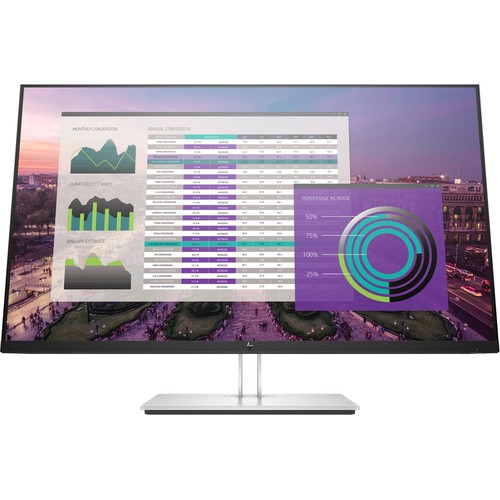
Built With Plenty Of Screen Space That Will Not Overwhelm Your Desk, The EliteDisplay E324q 31.5" 16:9 VA Monitor From HP Delivers Broad Device Compatibility With Ports That Include USB Type-C For Easy Pairing With A Range Of Systems. The E324q Features One DisplayPort 1.2 Port, One HDMI 1.4 Port, A USB Type-C Port That Only Supports DisplayPort Alternate Mode, A Second USB Type-C Port That Only Supports Data Transfers, Three USB Type-A Outputs, And A USB Type-B Input.
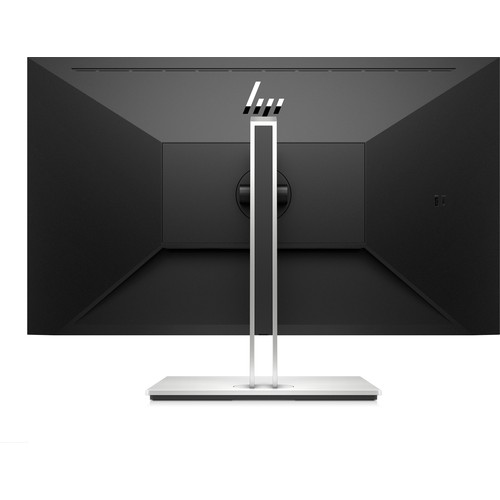
HP's EliteDisplay E324q Features An Anti-Glare Panel With Vertical Alignment (VA) Technology, A Native Resolution Of 2560 X 1440 At 60 Hz, Support For 8-Bit Color, Coverage For 72% Of The NTSC Color Gamut, A Widescreen 16:9 Aspect Ratio, A Static Contrast Ratio Of 3000:1, A Dynamic Contrast Ratio Of 10,000,000:1, 350 Cd/M2 Brightness, 93 Ppi, A 7 Ms (GtG) Response Time, And A Backlight Lifespan Of 30,000 Hours. Using The 178° Horizontal And Vertical Viewing Angles, It Is Possible To Watch Content From Virtually Any Position. To Further Help Improve Viewing And Accessibility, The Display Features A Vertical Tilt Of -5 To 20°, A Swivel Of 60° (-30 To 30°), A Rotation Of 90°, And A Max Height Adjustment Of 5.9". There Is Also A 100 X 100mm VESA Mount That Can Be Used To Attach This Display To A Wall. Or, You Can Mount An HP Desktop Mini, Chromebox, Or Select Thin Client Behind The Screen Or Directly On The Column Stand.
Display More Of Your Data At The Same Time In Quad HD 2560 X 1440 Resolution On A Massive 31.5" Diagonal Screen. No More Toggling Between Open Windows Or Paging Up And Down, And The Thin Design Enhances Your Modern Aesthetic.
Minimize Your Line-Of-Sight Disruptions And See More Of Your Screen With The Three-Sided Micro-Edge Bezel. Find Your Sweet Spot With Adjustable Tilt, Height, And Swivel Settings. Customize Portrait Or Landscape Views With Built-In Pivot Rotation.
Streamline Your Desk By Installing Your HP Desktop Mini, HP Chromebox, Or Select HP Thin Client Behind The Screen, Directly On The Column Stand.
Filter Blue Light Emission And Shift Colors To A Warmer Spectrum For More Comfortable Viewing With HP Low Blue Light Mode.
Customize A Total Solution With Options Designed For Your Display, Like The HP S101 Speaker Bar, Which Attaches Easily To The Lower Bezel To Add Stereo Audio Without The Desktop Clutter.
Manage Your Display And Make It Work For You. HP Display Assistant Allows You To Quickly Resize Screen Partitions, So You Can Work In Separate Regions Of The Screen And Helps Deter Theft By Dimming A Display That's Disconnected Without Approval.
Get specific details about this product from customers who own it.
-80x80.png)
