


| Display Features | ||
| Display Size | 27.0"(68.47cm) 16:9 | |
| Display Type | Display Viewing Area (H x V) : 608.6 x 348.3 mm Display Surface: Non-Glare |
|
| Resolution | 2560x1440 | |
| Aspect ratio | 16:9 | |
| Viewing Angle | 608.6 x 348.3 mm | |
| Brightness | Trace Free Technology : Yes ProArt Preset : Standard ProArt Preset : sRGB ProArt Preset : Scenery ProArt Preset : Reading ProArt Preset : Darkroom ProArt Preset : User mode1 ProArt Preset : User mode2 SPLENDID Technology : Yes Color Temp. Selection : Yes(4 modes) Color Adjustment : 6-axis adjustment(R,G,B,C,M,Y) Gamma adjustment: Yes (Support Gamma 1.8/2.0/2.2/2.4/2.6 ) Color Accuracy : △E< 2 ASUS ProArt Hardware Calibration: Yes ProArt Palette: Yes QuickFit: Yes PIP / PBP Technology: Yes HDCP: Yes VRR Technology: Adaptive-Sync Low Blue Light: Yes |
|
| Contrast Ratio | Contrast Ratio (HDR, Max) : 8,000:1 Contrast Ratio (Typ.) : 3000:1 ASUS Smart Contrast Ratio (ASCR) : 100000000:1 |
|
| Refresh rate | 60Hz | |
| Color Support | Color Space (sRGB) : 100% | |
| Response Time | 5ms(GTG) | |
| Power | ||
| Power Consumption | Power Consumption : <25W Power Saving Mode : <0.5W Power Off Mode : 0W (hard switch) Voltage : 100-240V, 50/60Hz |
|
| Audio Features | ||
| Speaker Details | Speaker: Yes(2Wx2) |
|
| Speaker | Yes(2Wx2) | |
| Physical Specification | ||
| Color | Display Colors: 16.7M | |
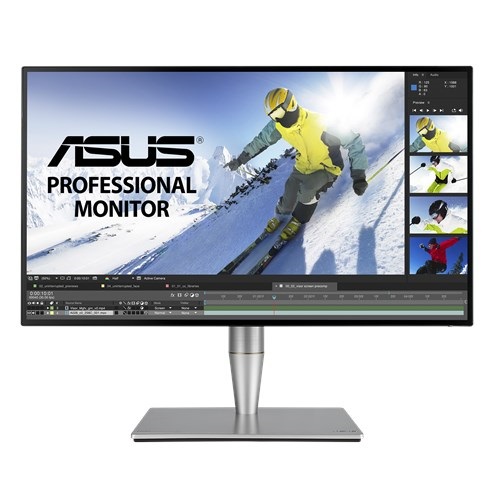
ASUS ProArt PA27AC HDR professional grade 27-inch monitor has the color accuracy of ΔE < 2 and 100% of sRGB color gamut. This WQHD IPS display with frameless design monitor has HDR function that makes it possible to create more dynamic and realistic images. Excellent connectivity of Thunderbolt™ 3 supports data transfers at up to 40 Gbps, and USB-C with Power Delivery provides up to 45W of power to external devices.
ASUS ProArt™ Calibration Technology offers advanced adjustments including a 14-bit lookup table for color accuracy and 5x5 grid uniformity testing. Its 4-side frameless design and up to 400 nits of brightness and HDR-10 provide lifelike experience. It has comfortable connectivity with displayPort and also support 45W power delivery. With having Windows- and Mac OS-certified, it is ideal for graphic designers, photographers, or anyone looking for high color accuracy. It can provide 77% more pixels than conventional Full HD monitor and with extra screen space you can work more easily and comfortably with less scrolling and zooming. If you do not have budget constrain you can certainly buy this its slim profile and ergonomically-designed monitor.
Professional monitors can get quite expensive, with features that might not even be used by most users. And the ASUS ProArt PA27AC actually offers plenty of features like that. I mean, do you see yourself using Thunderbolt 3 input, or daisy chaining Thunderbolt devices together? Or really use the 100% sRGB gamut and Delta E <2 color accuracy to finetune the color of your images and videos? Well, I don’t. But if you do, this might be the monitor for you, and the ASUS ProArt PA27AC isn’t even all that expensive in the grander scheme of things.
The brightness of the display when measured at 100% brightness in the Standard mode was 279cd/m2, although by default the ASUS ProArt PA27AC comes out of the box with the brightness set to 50%, which corresponds to a 206cd/m2. We will be performing our testing on the Standard mode at the latter brightness, as that’s what’s default. In the sRGB and Rec.709 modes, the brightness measured was 168cd/m2.
You can adjust the brightness in the Rec.709 mode, but the sRGB mode doesn’t allow you to touch any of the ASUS ProArt PA27AC’s visual settings. Turning on HDR and throwing the HDR/SDR brightness balance in Windows gets you the maximum 385cd/m2 in SDR content, but I can’t say that it is comfortable working with this brightness. Just leave it in auto and enjoy the monitor at the default 300 nits, with the extra brightness coming into play only when you are perusing HDR content.
Get specific details about this product from customers who own it.

-80x80.png)