


-80x80.png)

-80x80.jpg)



| Display Features | ||
| Display Size | Wide Screen 24.1"(61.13cm) | |
| Display Type | IPS | |
| Resolution | 1920x1200 | |
| Aspect ratio | 16:10 | |
| Viewing Angle | 178°(H)/178°(V) | |
| Brightness | 300 cd/㎡ | |
| Contrast Ratio | 80,000,000:1 | |
| Refresh rate | Analog Signal Frequency : 30~83 KHz(H)/ 50~76 Hz(V) | |
| Color Support | ASUS Smart Contrast Ratio (ASCR) : 80000000:1 | |
| Response Time | 6ms (Gray to Gray) | |
| Video Features | ||
| Others | Security: Kensington lock Trace Free Technology : Yes SPLENDID Video Intelligence Technology SPLENDID Video Preset Modes : 6 Modes Color Adjustment : 6-axis adjustment(R,G,B,C,M,Y) QuickFit (modes) : Yes (Letter/A4/Alignment Grid/Photo Modes) |
|
| Power | ||
| Power Consumption | Direct Power Power Consumption(Typical):< 15.78W Power Saving Mode:≦0.5W Power Off Mode:0.1W (hard switch ) Voltage:100–240V, 50/60 Hz |
|
| Audio Features | ||
| Speaker Details | Color Temperature Selection 4 Modes Speakers 1.5W x 2 Stereo RMS Flicker Free D-Sub Port |
|
| Speaker | 1.5W x 2 Stereo RMS | |
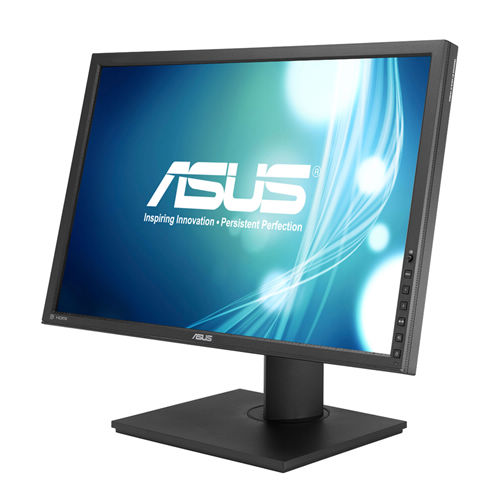
The ASUS PB248Q IPS Monitor From ASUS Features A Vertical Alignment (VA) Panel, A Native Resolution Of 1920 X 1080, Support For 16.7 Million Colors, A Widescreen 16:9 Aspect Ratio, A Static Contrast Ratio Of 80000000:1, 300 Cd/M2 Brightness, 81 Pixels Per Inch, And A 6 Ms (GtG) Response Time. Using The 178° Horizontal And Vertical Viewing Angles, It Is Possible To Watch Content From Virtually Any Position. This Display Connects To Your Host System Using Its HDMI 1.4 And VGA Inputs ASUS Has Engineered The ASUS PB248Q IPS Monitor With Support For 72% Of The NTCS Gamut. It Also Supports ASUS Eye Care, With Ultra-Low Blue Light And Flicker-Free Technologies, Plus ASUS SplendidPlus Technology For Scene-Specific Video And Image Optimization. To Further Help Improve Viewing And Accessibility, The ASUS PB248Q IPS Monitor Has A Height Adjustment Of 5.1", A Tilt Of -5 To 35°, A 90° Clockwise Pivot, And A 180° Swivel Of -90 To 90°. The Back Of The Display Can Also Accommodate A MiniPC Using A Separately-Sold Mount.
The ASUS PB248Q Features A 16:10 Aspect Ratio, 1920 X 1200 A+ IPS LED-Backlit Panel For 100% SRGB And 72% NTSC Color Reproduction; Addititionally, Along With A 178° Wide Viewing Angle, It Ensures Quality Visuals And Minimal Onscreen Color Shift From Almost Any Viewing Position.
With ASUS Smart Contrast Ratio (ASCR) Of 80,000,000:1 And 300cd/M² Of Brightness, The ASUS PB248Q Enhances Display Contrast And Sharpness – By Adjusting The Luminance Of The Backlight To Achieve The Darkness Black And Brightest White – Delivering Lifelike Visuals.
Customized Hue And Saturation Control With 6 Color Adjustment Allows User To Adjust Six Colors (Red, Green, Blue, Cyan, Magenta And Yellow) Independently Without Effecting Other Colors.
ASUS PB248Q Also Delivers Ultra-Smooth Visuals Thanks To A 6ms (GTG) Response Time – Ensuring Users Have A Lag-Free Viewing Experience When It Comes To Watching Movies Or Playing Games. Games Played Under The PB248Q Are More Vivid – As All Details Can Be Seen And True Color Can Be Shown With The PB248Q.
ASUS Splendid™ Video Intelligence Technology Is Built Upon A Color Engine That Automatically Analyzes And Determines The Nature Of The User’s Current Task, Thereafter Adjusting The Display’s Parameters According To Ensure Color Accuracy And Image Fidelity. Six Preset Modes (Scenery, Theater, SRGB, Standard And Two User Modes) Can Be Selected Via A Designated Hotkey.
Get specific details about this product from customers who own it.