


| DISPLAY DETAILS | ||
| Color | Black, Silver | |
| Connectivity | 1x USB Cable | |
| Keyboard | 8 customizable, application-specific ExpressKeys™ | |
| Resolution | 5080 LPI | |
| Dimensions | 13.8 x 7.85 x 0.65 inch / 350.8 x 199.5 x 16.5 mm | |
| Features | ||
| Active area | 9 X 5 inch / 230.76 x 130.16 mm | |
| Tilt | ±60 levels / 60 degrees | |
| Pen Technology | Nibs Model PA1 Pen Model PA1 Battery-free Stylus Pen Pressure 8192 levels Battery-Free Pen |
|
| Others | 8 customizable, application-specific ExpressKeys™ Ergonomics Right or left-handed use |
|
| Weight | 631g | |
| Pen Information | ||
| Nibs | PA1 | |
| Pen Battery | Battery-Free | |
| Pen Included | Yes | |
| Pen Pressure Level | 8192 levels | |
| Pen Resolution | 5080 LPI | |
| Pen technology | Battery-Free Pen | |
| Pen Type | Stylus | |
| WARRANTY INFORMATION | ||
| Warranty | 01 Year | |
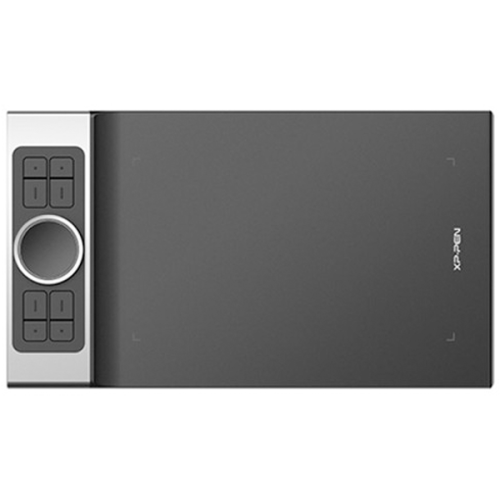
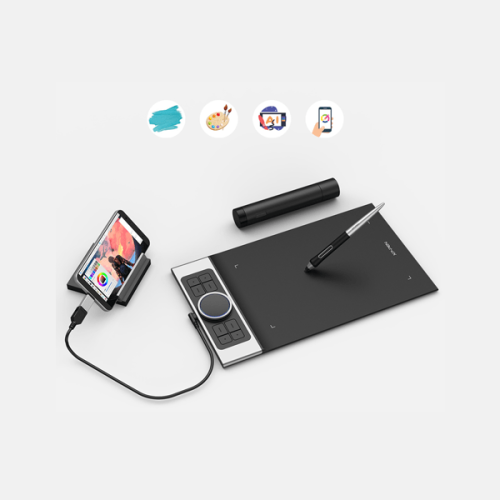
XP-Pen Deco Pro S Mechanical and virtual wheel with 8 shortcut keys 8,192 pressure sensitivity levels and pen tilt sensitivity Compatible with Windows® 10/8/7 (32/64bit), MAC OS X® 10.10 and above, Android 6.0, Chrome OS 88. X and above. The XP-Pen Deco Pro Series is crafted with an aluminum casing and features a 7mm thin curved casing. The black and silver color scheme blends well into its streamlined design, making it both smooth to use and sleek in appearance. As such a professionally designed tablet, Deco Pro has been awarded as the 2019 Red Dot Design Award Winner and the 2018 Good Design Award Winner! Meet the groundbreaking double wheel design paired with trackpad functionality! With a bigger wheel, it is easier to control and operate more accurately. Use the outer mechanic wheel to zoom in /out of your canvas, adjust brush size, etc, while the inner virtual wheel can be used as a trackpad mode, scroll up and down, and more. Both wheels can also be programmed to customize copy, space, and other common functions. Fully utilize the two-wheel together and use 4 shortcuts at the same time without switching back and forth to guarantee a complete focus on your creation and unparalleled efficiency. The roller wheel comes equipped with an indicator light and adjustable brightness level, letting you work and create in your preferred lighting environment, so you can stay immersed in your creation even in dim light. The XP-Pen Deco Pro Small supports connection with Android tablets and mobile phones. It works with most software such as XP-Pen Deco Draw, ibis Paint X, FlipaClip, Medibang, Autodesk Sketchbook, Zenbrush, Artrage, and more. The entire working area of the tablet is your creation area, not limited to only using part of the working area, bringing you a new creative experience with extreme portability!
The XP-Pen Deco Pro Small supports up to 60 degrees of tilt function, quickly and easily responding to the way your hand moves, now you don’t need to adjust the brush directly in the software, again and again, simply tilt to add shading to your creation. And enjoy smoother and more natural transitions between lines and strokes.
With up to 8,192 levels of pressure sensitivity, the Deco Pro S provides you with precise control and accuracy. Create fine lines in an incredibly natural and fluid experience, all with our new battery-free stylus.
XP-Pen Deco Pro Small is the first drawing tablet that comes equipped with a USB-C port. Now you can directly connect your iMac/Mac Book Pro and other Windows computers that support USB-C input to the Deco Pro without using a USB-C to USB adapter. Its interface is symmetrical, making it equally comfortable for right- and left-handed users. You can also rotate the Deco Pro to 0 degrees, 90 degrees, 180 degrees, and 270 degrees depending on your different creative requirements.
The new PA1 stylus is battery-free, weighs only 13.3g, and features a nice black and silver design with a sleek pointed end. There are no batteries or clumsy cords for charging and the one-click toggle allows you to switch between pen and eraser modes instantly, creating a more efficient and less frustrating workflow.
XP-PEN Deco Pro S Features
In summary, the XP-PEN Deco Pro Small Drawing Tablet combines a compact design, high-resolution capabilities, customizable express keys, and advanced pen technology to cater to the needs of digital artists seeking a versatile and portable drawing solution.
XP-Pen DECO PRO S Drawing Tablet Review:
Get specific details about this product from customers who own it.

