
Your compare list is empty!
-11% OFF
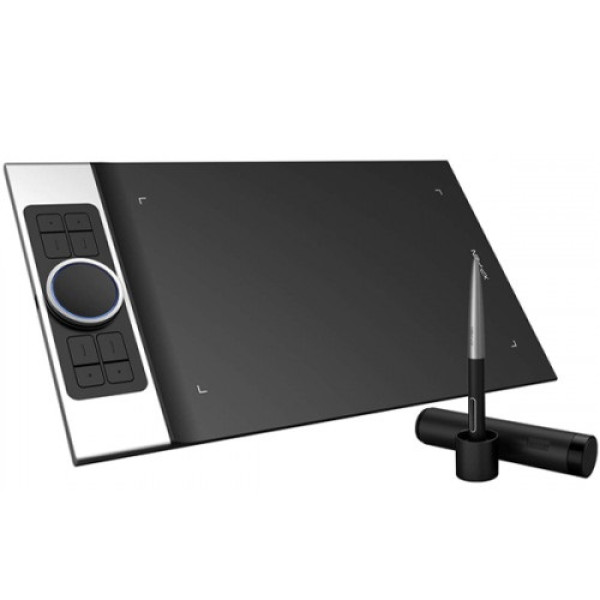 Click to zoom
×
❮❯
XP-Pen Deco Pro Medium Android Drawing Graphic Tablet
Key Features
- Improved for Unparalleled efficiency
- Natural Tilt Support
- Illuminate your Workflow
- An all new creative experience
12,490৳14,000৳
Cash Discount Price
Online / Cash Payment
2,082৳/month
Regular Price: 12,490৳
EMI Facility Available***
Specification
| DISPLAY DETAILS | |
|---|---|
| OS Support | Android Support: 6.0 and Above |
| Accuracy | ±0.01 Inch |
| Pressure Sensitivity | 8192 Levels |
| Report Rate | Max ≥200 RPS |
| Resolution | 5080 LPI (Lines per inch) |
| Features | |
| Active area | 11" x 6" |
| Reading Height | 10 mm |
| Stylus Pen | P1A Battery Free Passive Stylus |
| Compatibility | Win 10/9/7 & MAC 10.10 above |
| Interface | USB 5V (Type -C Port Only) |
| Others | Buttons and Shortcuts: 8 Buttons + Mechanical Wheel + Virtual Wheel + Indicator Light; |
| Pen Information | |
| Nibs | 8x Replacement Pen Nibs |
| Desktop Pen Stand | Yes |
| Pen Battery | Battery Free |
| Pen Included | Yes |
| Pen Pressure Level | 8192 |
| Pen Resolution | 5080 lpi |
| Pen Switch | 2 |
| Pen technology | Stylus Pen |
| Pen Type | Cordless |
| Tilt Range | 60 degrees |
| WARRANTY INFORMATION | |
| Warranty | 1 Year (No Warranty for Pen & Accessories) |
Description
About XP-Pen Deco Pro Medium
The XP-Pen Deco Pro Series is crafted with an aluminum casing and features a 7mm thin curved casing. The black and silver color scheme blends well into its streamlined design, making it both smooth to use and sleek in appearance. As such a professional designed tablet, Deco Pro has been awarded as the 2019 Red Dot Design Award Winner and the 2018 Good Design Award Winner! Meet the groundbreaking double wheel design paired with trackpad functionality! With a bigger wheel, it is easier to control and operate more accurately. Use the outer mechanic wheel to zoom in /out of your canvas, adjust brush size, etc, while the inner virtual wheel can be used as a trackpad/mouse mode, scroll up and down, and more. Both wheels can also be programmed to customize copy, space, and other common functions. Fully utilize the two wheel together and use 4 shortcuts at the same time without switching back and forth to guarantee a complete focus on your creation and unparalleled efficiency. The roller wheel comes equipped with an indicator light and adjustable brightness level, letting you work and create in your preferred lighting environment, so you can stay immersed in your creation even in dim light. The XP-Pen Deco Pro series supports connection with Android tablets and mobile phones. It works with most software such as XP-Pen Deco Draw, ibis Paint X, FlipaClip, Medibang, Autodesk Sketchbook, Zenbrush, Artrage, and more. The entire working area of the tablet is your creation area, not limited to only using part of the working area, bringing you a new creative experience with extreme portability! The XP-Pen Deco Pro supports up to 60 degrees of tilt function, quickly and easily responding to the way your hand moves, now you don't need to adjust the brush direction in the software again and again, simply tilt to add shading to your creation. And enjoy smoother and more natural transitions between lines and strokes. With up to 8,192 levels of pressure sensitivity, the Deco Pro provides you precise control and accuracy. Create fine lines in an incredibly natural and fluid experience, all with our new battery-free stylus. The Deco Pro features 8 responsive shortcut keys and two dial wheels that can be programmed to many different software programs, giving you instant access to specific functions for the task at hand to expand your creative output. The Deco Pro is the first drawing tablet that comes equipped with a USB-C port. Now you can directly connect your iMac/Mac Book Pro and other Windows computers that support USB-C input to the Deco Pro without using a USB-C to USB adapter. Its interface is symmetrical, making it equally comfortable for right- and left-handed users. You can also rotate the Deco Pro to 0 degree, 90 degree, 180 degree and 270 degree depending on your different creative requirements. The new PA1 stylus is battery-free, weighs only 13.3g, and features a nice black and silver design with a sleek pointed end. There are no batteries or clumsy cords for charging and the one-click toggle allows you to switch between pen and eraser modes instantly, creating a more efficient and less frustrating work flow. The XP-Pen Deco Pro Series comes in two sizes for your option. The Deco Pro Small features a 9x5 inch working area, offering a compact and portable option while the Deco Pro Medium features an 11 x 6 inch working area, giving you a bigger canvas for your creations. The XP-Pen Deco Pro Series is compatible with Windows 7/8/10, Mac OS X 10.10 and above, Android 6.0 and above. Works with most major creative software including Photoshop, SAI, Painter, Illustrator, Clip Studio, GIMP, Medibang, Krita, Fire Alpaca, Blender® 3D and more.
XP-Pen Deco Pro Medium Graphic Tablet Features
- Android OS Support: The tablet is specifically designed to support Android devices with version 6.0 and above, offering compatibility for users who prefer drawing on their Android tablets or smartphones.
- High Precision Accuracy: The tablet provides precise input with an accuracy of ±0.01 inch, ensuring that digital artists can create detailed and accurate artwork.
- Pressure Sensitivity: Featuring 8192 levels of pressure sensitivity, the tablet allows for a wide range of pen pressure, enabling artists to create varying line thicknesses and shading effects.
- Swift Report Rate: With a maximum report rate of over 200 RPS (Reports Per Second), the tablet offers responsive and lag-free pen input, ensuring a natural and fluid drawing experience.
- High Resolution: The tablet boasts a resolution of 5080 LPI (Lines per Inch), contributing to the overall precision and clarity of digital artwork.
- Spacious Active Area: The tablet provides a generous active area of 11" x 6", giving artists ample space to express their creativity and work on detailed projects.
- Low Reading Height: With a reading height of 10 mm, the tablet allows for close and accurate pen control, enhancing the overall drawing experience.
- P1A Battery-Free Passive Stylus: The stylus included with the tablet is the P1A Battery-Free Passive Stylus, offering a natural drawing experience without the need for constant charging or battery replacement.
- Compatibility: The tablet is compatible with both Windows (Win 10/9/7) and Mac (MAC 10.10 and above) operating systems, providing versatility for users who work across different platforms.
- USB Type-C Port: The tablet uses a USB 5V interface with a Type-C port, offering a modern and versatile connection option for users.
- User-Friendly Controls: The tablet features 8 customizable buttons, a mechanical wheel, a virtual wheel, and an indicator light for a personalized and efficient workflow.
- Pen Information: The pen comes with 8 replacement pen nibs, a desktop pen stand, and is battery-free, ensuring a consistent and uninterrupted drawing experience.
- Dual Pen Switches: The pen is equipped with 2 pen switches, providing additional functionality and convenience for quick access to shortcuts.
XP-Pen Deco Pro Medium Android Drawing Graphic Tablet Review:
What is the price of XP-Pen Deco Pro Medium Android Drawing Graphic Tablet?
The latest price of XP-Pen Deco Pro Medium Android Drawing Graphic Tablet in Bangladesh is 12,490৳. You can buy the XP-Pen Deco Pro Medium Android Drawing Graphic Tablet at the best price from our website or visit our shop.
Warranty Information
Official Warranty
Xp-Pen
Covered by the brand's authorised warranty. Claims are handled at the PC House service center, Multiplan Center, Dhaka.
- Warranty covers manufacturing defects under normal use.
- 7-day replacement for dead-on-arrival or manufacturing faults (box and accessories must be intact).
- Keep the invoice and warranty sticker safe; both are required for any claim.
- Physical damage, burn marks, liquid damage and unauthorised repair are not covered.
Customer Reviews
Questions & Answers
Have a question about this product? Ask our team.
Ask Question