



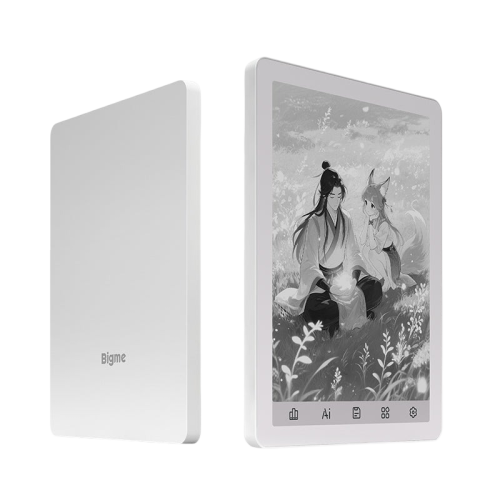
| Main Feature | ||
| Storage | 6GB RAM+128GB ROM | |
| Camera | Front 5MP/ Rear 8 MP | |
| Screen Size | 13.3 inch | |
| Connectivity | 2.4G/5G Wifi | |
| Microphone | Yes | |
| Front Light | Yes | |
| CPU | Octa-core, 2.6GHz | |
| Bluetooth | Supported | |
| Port | Type C | |
| Battery | 4000mAh | |
| Physical Spec | ||
| Dimensions | 306.5 × 230 × 7.9 mm | |
| Weight | Around 676 g | |
| Speaker | Yes | |
| OS | Android 11 | |
| PPI (Pixels Per Inch) | 300 | |
| Warranty | ||
| Warranty | 1 Year | |
The Bigme X6 is a massive 13.3-inch E-ink tablet designed specifically for professionals and academics who handle large-scale documents. Unlike standard handheld e-readers, the X6’s screen size is roughly equivalent to a sheet of A4 paper, making it a premier choice for reading technical PDFs, architectural blueprints, and legal documents without the constant need for zooming or panning. High-End Display and HardwareThe device features an E-ink Carta HD display with a resolution of 2220 x 1650. While its 207 PPI is lower than that of smaller e-readers, the sheer screen real estate and the flush-glass design provide a premium, paper-like feel. It stands out in the 13.3-inch category by including a 36-level front light with both warm and cool temperature adjustments—a feature often omitted in large-format e-paper devices. Under the hood, the X6 is powered by a high-performance 2.3GHz octa-core processor, 6GB of RAM, and 128GB of internal storage. This hardware stack makes it one of the fastest e-notes on the market, capable of opening massive 100MB+ PDF files and running third-party Android apps with minimal lag. Productivity and AI FeaturesThe Bigme X6 is deeply focused on the "smart office" experience:Voice-to-Text: Equipped with a four-microphone array, it supports real-time meeting transcription in over 30 languages with an accuracy rate of 98%.Intelligent Stylus: The included magnetic remote-control pen features buttons for page-turning, voice control activation, and customizable shortcuts. Android 11 Ecosystem: With an open Android system, users can install apps like Google Drive, Microsoft OneDrive, or specialized annotation tools.
Get specific details about this product from customers who own it.
