


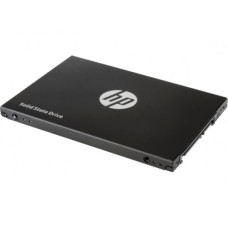
The Hewlett-Packard Company, usually known as HP, is an American company with its headquarters situated in Palo Alto, California. They produce and market a wide range of IT-related parts and software. They supply SSD for a variety of uses in addition to all the other components. Multiple regions of the drive can be read in parallel by the HP SSD. TRIM, Garbage Collection, and Wiper Utility are examples of integrated optimization features that are directly managed by the SSD and the system in these SSD. When these functionalities are supported by the drive and the system driver, they often operate automatically in the background. There are situations where SSD optimization must be initiated manually or when the tools must be set up to run at a specific time. Make sure the firmware on your SSD is updated regularly.
HP offers a variety of SSD (Solid State Drives) catering to different needs and specifications. Here are some of the common types:
These solid-state drives (SSD) use the Serial ATA (SATA) interface for data transfer. They offer fast read and write speeds compared to traditional hard disk drives (HDDs) and are commonly used in consumer laptops, desktops, and servers.
NVMe (Non-Volatile Memory Express) SSD leverage the NVMe protocol for high-speed data transfer between the storage device and the system. They offer significantly faster performance compared to SATA SSD, making them ideal for demanding applications such as gaming, content creation, and data centers.
PCIe (Peripheral Component Interconnect Express) SSD connect directly to the motherboard via PCIe slots, bypassing the limitations of SATA interfaces. They offer even higher speeds and lower latency than both SATA and NVMe SSD, making them suitable for enterprise environments and high-performance computing tasks.
When considering buying an HP SSD (Solid State Drive), several factors can influence your decision:
Determining your storage needs is the first step when buying an SSD. Consider the amount of data you plan to store, including your operating system, applications, and files. SSDs come in different sizes, ranging from a few hundred gigabytes to several terabytes. Choose a capacity that accommodates your current needs while leaving room for future expansion. They can range from as small as 128 gigabytes (GB) to as large as several terabytes (TB). HP offers SSD tailored for different use cases, including consumer laptops, desktops, enterprise servers, and data centers.
Read/write speeds, which indicate how rapidly the user can read or write data from the disk, are taken into account when evaluating the performance of SSD. The more technical measurement known as IOPS (Input/Output per second; pronounced eye-ops) determines how many bytes of data you can copy to or retrieve from the disk in a second. Traditional SSD technology, or SATA SSD, have an IOPS of about 500/500 MB/s. More recent generation NVMe SSD have IOPS ranging from 1000 to even 5000 MB/s. NVMe SSD can be used in your gaming and video streaming processors, as well as as a boot drive.
The form factor of an SSD is its physical size and interface that dictates how it connects to your system. Common form factors:
SSD connect to your computer via distinct interface standards. Serial ATA (Serial ATA) and NVMe (Non-Volatile Memory Express) are the two most often used interfaces. Although NVMe SSD offer noticeably quicker speeds, SATA SSD are compatible with the majority of systems.
If you are purchasing an SSD for a laptop or a device where power efficiency is crucial, consider SSD with low power consumption. SSD are inherently more power-efficient than traditional hard drives, contributing to extended battery life in portable devices.
PC House BD, Bangladesh's premier destination for laptop, desktop, processor, smartwatch, and component, welcomes you to explore our nearby branches. Discover your preferred HP SSD at competitive prices, available both in-store and on our official e-commerce platform. Benefit from nationwide delivery and extensive post-purchase assistance with every order. At PC House BD, we provide 24/7 online support services for your ease. Easily adjust the prices of HP SSD on our platform. Be assured that any warranty issues are promptly dealt with, ensuring your satisfaction. Before making payment, thoroughly examine the delivered product. Should you have any queries, please contact us or return the item to our delivery personnel. Stay updated on discounts, product launches, and upcoming events by signing up on our website. Experience smooth transactions with PC House BD and HP SSD.